ВУЗ: Не указан
Категория: Не указан
Дисциплина: Не указана
Добавлен: 19.08.2020
Просмотров: 882
Скачиваний: 3
Figure 6 Language training software
© Copyright 2002 Language
Technology Institute,
Carnegie Mellon University
Reprinted with Permission.
(Note:
This software has a patent pending and has been licensed through the
CMU Tech Transfer Office exclusively to the Carnegie
Speech Company,
a spin-off of Carnegie Mellon University.)
Interactive Learning
Music composer and inventor Tod Machover at the MIT Media Lab and Media Lab Europe started Toy Symphony, an international music performance and education project aimed at introducing children to new ways to make music. The project involves using Music Toys to engage children in listening, performing, and music-composing tasks. Children can play along with some of the world's most accomplished musicians who are participating in this project.
Below is an image of one of the toys. Read about what it does.
Figure 7 Beatbug music toy
© Copyright 2002-2003 MIT
Media Lab
Reprinted
with permission.
In Business
Supply Chain Management
Supply chain management aims to manage and track the supply of raw components, their usage in the manufacturing process, and delivery of finished products to customers. Some supply chain management software applications use mathematical algorithms to improve the flow of the supply chain and minimize inventory. You can read more about Supply Chain Management.
Project Management
Product development information, which includes product requirements, work schedules, project milestones, budgets, and product design need to be organized and tracked to monitor the progress of the project. Software applications are capable of keeping track of the product database, work schedule, and budget of the project to help you pinpoint potential barriers to the timely completion of the project. You can see some project management software system demos provided by Microsoft (requires Macromedia Flash Player and Microsoft Internet Explorer).
Customer Relationship Management
Customer relationship management (CRM) is a process that gathers information about the customer base, marketing effectiveness, and market trends in order to learn more about customers' behaviors. A CRM software system can collect information about customer demographics, and investigate customer-purchasing behaviors with the objective of predicting customer needs and increasing revenues.
A CRM system may involve the use of an "Intelligent Agent," which is a program that collects information about a user's behavior, and customizes the content on a website accordingly. For example, when you go to Amazon.com, the site can generate a personalized page for you that contain advertisements of products that may interest you based on your purchasing history. If you had bought a novel in the Harry Potter children's fiction series, then your Amazon page may advertise other Harry Potter volumes or other books about adolescent adventure that you have not purchased.
You can learn more about CRM by reading some CRM Case Studies.
Sales and Marketing Using Electronic Commerce
Using the Internet, commerce can be conducted online through the World Wide Web. To enable electronic transactions, a company would need software for generating purchase orders or quotation requests, process invoices, build marketing material, mechanism to respond to customers and process orders, and keep track of customer-purchasing behaviors. Additionally, some commercial websites allow you to customize your own product. For example, Nike's website enables you to purchase shoes designed by you. You can choose different color combinations for your shoe. You can even specify personalized text to be placed on the shoe.
Manufacturing Research
Computer simulation tools can be used to design products. For example, in automobile tire research, simulation tools can be used to estimate braking distances of tires under various road conditions and tire tread patterns. Researchers from Pusan National University (J.R. Cho, H.W. Lee and W.S. Yoo) have used computer simulation and published their results in a paper titled A wet-road braking distance estimate utilizing the hydroplaning analysis of patterned tire in the International Journal for Numerical Methods in Engineering. Volume 69 Issue 7.
Find out more about software applications for businesses.
In Entertainment
Movies
Computer-generated special effects have made possible the creation of award-winning films such as Star Wars: Episode II, Jurassic Park, Men in Black, Jumanji, Forrest Gump, and the Perfect Storm.
In particular, Star Wars: Episode II was the first major motion picture to be shot entirely on digital cameras. The production team saved time and money usually invested in film stock and photochemical processing by using digital cameras. Traditionally, images shot on film had to be scanned and transformed into digital media to incorporate visual effects. Digital cameras facilitated the process of transferring movie images from different stages of production.
You can read about how movie effects are incorporated using computer technology by Industrial Light & Magic, the company that created the visual effects for the first Star Wars movie.
Video Games
The video gaming industry has advanced greatly from the simple black and white dotted images of video game characters from the 70s to the life-like 3-D simulations of video game creatures. Video game systems are computer systems integrated with sophisticated video imaging technology to bring a world of fantasy to life on your computer screen. You can browse through a sample video game website.
Music
Distribution of music in the 20th century has evolved from analog to digital form. Music can be downloaded from Internet sites and stored in hand-held size MP3 players. This expanded the volume of music selections that can be stored and played. You can read about how MP3 Players work.
Digital Photography
More and more people are using digital cameras instead of conventional film cameras. All digital cameras have a built-in computer that records images in electronic form. Images can be viewed immediately after they have been captured, and they can be uploaded onto a computer or exchanged over the Internet. You can read about how digital cameras work.
Travel
Researchers at the School of Computer Science, Carnegie Mellon University have created software that reads Chinese signs and translates them into English using only a palm-size computer equipped with a small camera. Find out more about the sign translation technology.
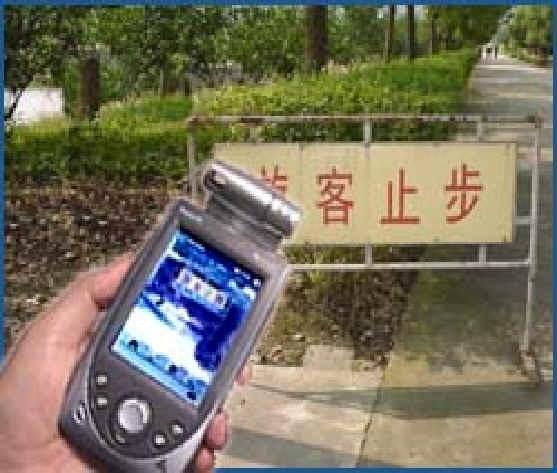
Figure 9 Sign translation device
© Copyright 2002 interACT,
Carnegie Mellon University
2002
Reprinted with permission.
Wearable Computer Systems
Computer systems can also be embedded in devices that are more portable such as a wristwatch or a headphone. For example, a GPS (Global Position System) can be embedded in your wristwatch to help you find directions to a specific destination. You can read about fashion-oriented accessories that incorporate technology being developed at Carnegie Mellon University, and wearable technology developed at MIT Media Lab.
For additional applications of computer systems current being investigated, you can read about research at Carnegie Mellon University and research at MIT Media Lab.
1.3 Data Representation in a Computer System
Computers represent data using 0's and 1's, also known as binary numbers. Why do computers use binary notation instead of the more familiar decimal notation (using digits 0-9) that people use? Each digit, whether binary or decimal, must be represented by a voltage in the computer's circuitry. It is easy to build circuits that discriminate between two voltages. We could call these voltages "on" and "off." It is much harder, though not impossible, to build circuits to discriminate reliably among ten different voltages.
Изучение Цели: Знание того, как данные представлены, используя двоичные цифры 0's и 1's. Также, учитесь относительно того, как способность(вместимость) памяти(хранения) данных описана, используя типичные модули меры, используемой за эти годы.
|
Reading Sequence:
|
|
Assessments: |
1.3.1 Bits and Bytes
Data Representation Using Binary Digits
A piece of data, such as an alphabet letter, may be represented using a sequence of binary digits- 0's and 1's. There are several types of codes used to represent character data. For example, using extended ASCII (America Standard Code for Information Interchange) code, the alphabet letter "a" can be represented using a series of eight binary digits, "01100001." Each binary digit is called a bit. And, eight bits is one byte. Extended ASCII code uses eight bits (or one byte) to represent input characters. Below are binary representations of characters in extended ASCII code.
Увеличивающий Потребность в Байтах
Представление Данных, использующее Двоичные Цифры
Часть данных, типа символа алфавита, может быть представлена, используя последовательность двоичных цифры 0 и 1's. Имеются несколько типов кодов, имел обыкновение представлять символьные данные. Например, используя расширенный(продленный) ASCII (Код Стандарта Америки для Информационного Обмена) код, символ алфавита "a" может быть представлен, используя ряд восьми двоичных цифр, "01100001". Каждая двоичная цифра называется немного. И, восемь битов - один байт. Расширенный(продленный) код ASCII использует восемь битов (или один байт) чтобы представить входные символы. Ниже - двоичные представления символов в расширенном(продленном) коде ASCII.

Figure 1 ASCII code
All data, including audio, visual, and program instruction data can be represented and stored using a sequence of binary digits, or a sequence of bytes. Recall that a file is a collection of data. In some files, the bits of data directly encode individual letters, numbers, and punctuation symbols that make up words and sentences. In other files such as an image file, the bits of data need to be computed in order for them to transform to images that we can interpret.
Все данные, включая аудио, визуальный, и данные команды программы могут быть представлены и сохранен, используя последовательность двоичных цифр, или последовательности байтов. Выберите, что файл - совокупность данных. В некоторых файлах, биты данных непосредственно кодируют индивидуальные символы, номера(числа), и символы пунктуации, которые составляют слова и предложения. В других файлах типа файла изображения(образа), биты данных должны быть вычислены для них, чтобы преобразовать к изображениям(образам), которые мы можем интерпретировать.
Most applications such as Microsoft Word or PowerPoint encode information in specialized ways that are not readable by humans. Thus, even though Microsoft Word is often used to edit text, a Word document cannot be properly displayed by a simple text editor like Notepad because the document includes information in a format specific to Microsoft Word. Therefore, it must be opened by Microsoft Word to be read. Some files have a header section that indicates which format was used to encode the data in order to allow the computer to reassemble the binary data back into the human-readable form of the document.
Большинство приложений типа Microsoft Word или PowerPoint кодирует информацию специализированными способами, которые не читаемы людьми. Таким образом, даже при том, что Microsoft Word часто используется, чтобы редактировать текст, документ Слова не может быть должным образом отображен простым текстовым редактором подобно Записной книжке, потому что документ включает информацию в формате, определенном к Microsoft Word. Поэтому, это должно быть открыто на Microsoft Word, который нужно читать. Некоторые файлы имеют раздел заголовка, который указывает, который формат использовался, чтобы кодировать данные, чтобы позволить компьютеру повторно собирать двоичные данные назад в удобочитаемую форму документа.
Increasing Need for Bytes
Увеличение Потребности в Байтах
In the late 1970s and early 1980s, inexpensive personal computers were manufactured for the first time, and soon a large consumer market developed. At first small amounts of memory such as thousands of bytes were all that was needed to handle the simple spreadsheet and word processing tasks. But, before long, users wanted software to allow them to do more tasks such as creating drawings and generating complex page layouts. As consumer demand grew, computing requirements also grew. This demand led to new developments that expanded memory capacities. By the mid 1980s, memory was up to millions of bytes. Today, office and home computers often have billions of bytes in memory capacity. Memory for data-intensive systems, such as the Geographic Information System (GIS), require trillions of bytes. Below is a chart illustrating the storage capacity over the years since the 1970s with their associated prefix and abbreviation.
В конце 1970-ых и в начале 1980-ых, недорогие персональные компьютеры были изготовлены впервые, и скоро большой развитый рынок потребителя. В первых маленьких объемах памяти типа тысяч байтов были все, что было необходимо, чтобы обработать простую электронную таблицу и задачи обработки текстов. Но, вскоре, пользователи хотели, чтобы программное обеспечение позволило им делать большее количество задач типа создания рисунков и производства сложных размещений страницы. Поскольку запрос потребителя рос, вычислительные требования также росли. Этот запрос вел к новым событиям, которые расширили мощности памяти. К середине 1980-ых, память была до миллионов байтов. Сегодня, офис и бытовые ЭВМ часто имеют миллиарды байтов в способности(вместимости) памяти. Память для данные-интенсивных систем, типа Географической Системы Информации (GIS), требует триллионов байтов. Ниже - диаграмма, иллюстрирующая способность(вместимость) памяти(хранения) за эти годы начиная с 1970-ых с их связанной приставкой и сокращением.
|
Decade |
1970s |
1980s |
1990s |
2000s |
|
Order of magnitude in |
Thousands |
Millions |
Billions |
Trillions |
|
Prefix |
Kilo (103) |
Mega (106) |
Giga (109) |
Tera (1012) |
|
Abbreviation |
K |
M |
G |
T |
In terms of storage, more is better—which means more information in the form of both data and programs that act on that data can be stored. Corresponding to the growth in storage capacity, memory capacity is also increasing. Moreover, memory technologies are getting smaller, lighter, and faster, for about the same price. You will learn more about storage and memory technologies in the next unit of this course.
В терминах памяти(хранения), больше - средства(посредством) " лучше, который " большее количество информации в форме и данных и программ, которые действуют на которые данные могут быть сохранены. Соответствуя росту в способности(вместимости) памяти(хранения), способность(вместимость) памяти также увеличивается. Кроме того, технологии памяти становятся меньшими, легче, и быстрее, для относительно той же самой цены. Вы будете учиться больше относительно памяти(хранения) и технологий памяти в следующем модуле этого курса.
1.3.2 Number Systems
The world of computing uses several number systems to represent data. While the decimal system, also known as base10, will be familiar to people, as it is the numbering system used in everyday life, binary (base2) and hexadecimal (base16) are common number systems used in computing today.
Мир вычисления использований несколько систем номера(числа), чтобы представить данные. В то время как десятичная система, также известный как base10, будет знакома людям, поскольку это - система нумерации, используемая в каждодневной жизни, двоичный (base2) и hexadecimal (base16) - общие(обычные) системы номера(числа), используемые в вычислении сегодня.
Decimal
We will start our discussion on number systems by examining the decimal system as an example of a number system. The decimal number system contains ten values- 0, 1, 2, 3, 4, 5, 6, 7, 8, and 9. Each number in the decimal number system can be broken into digits by their "place" in the number. Using the number 43,872 as an example, 2 is in its 0th place, 7 is in its first place, 8 in its second, 3 in its third, and 4 in its fourth. Each place has a value that can be represented either exponentially or by its decimal values. The following table shows the exponential and decimal representation for each place in the number 43,872.
Мы запустим наше обсуждение по системам номера(числа), исследуя десятичную систему как пример системы номера(числа). Десятичная система номера(числа) содержит десять значений, 1, 2, 3, 4, 5, 6, 7, 8, и 9. Каждый номер(число) в десятичной системе номера(числа) может быть, ворвался в цифры их "местом" в номере(числе). При использовании номера 43,872(числа), поскольку пример, 2 находится в его 0-ом месте, 7 находится в его первом месте, 8 в его секунде, 3 в его трети, и 4 в ее четвертый. Каждое место имеет значение, которое может быть представлено или по экспоненте или его десятичными значениями. Следующая таблица показывает показательному и десятичному представлению для каждого места в номере 43,872(числе).
|
Place |
4th |
3rd |
2nd |
1st |
0th |
|
Digit |
4 |
3 |
8 |
7 |
2 |
|
Exponential value of the place |
104 |
103 |
102 |
101 |
100 |
|
Decimal value of the place |
10,000 |
1,000 |
100 |
10 |
1 |
Table 1 Exponential and decimal values corresponding to a digit's place in a number
Note that the exponential values are raised to a power corresponding to the place of the digit. For example, the exponential value of the 4th place is 104.
To determine the value of the number, multiply the digit contained in a column by the value that column represents. The following is a sample calculation for the previous example.
Где p - место, b - основа, dp - цифра в самом высоком месте в номере(числе), и dp-1 - следующее самое высокое место в номере(числе), и так далее.
4 × 10⁴ + 3 × 10³ + 8 × 10² + 7 × 101 + 2 × 100 =4 × 10,000 + 3 × 1000 + 8 × 100 + 7 × 10 + 2 × 1 =40,000 + 3000 + 800 + 70 + 2 =43,872
While performing these calculations on a decimal number seems trivial, it demonstrates a pattern, or formula can be used to convert a number in any numbering system to decimal.
dp(b)p + dp-1(b)p-1 + . . . + d0(b)0
Where p is the place, b is the base, dp is the digit in the highest place in the number, and dp-1 is the next highest place in the number, and so on.
Пока, мы только обсудили номера(числа) преобразования к десятичному числу. Также важно быть способно конвертировать(преобразовать) номера(числа) от десятичного числа до других систем нумерации. При продолжении с base4 системой, позвольте нам конвертировать(преобразовывать) 89 от десятичного числа до base4.
Сначала, найдите значение p, где 4p < = 89 < 4p+1. В этом случае(регистре) p = 3. P - значение самого высокого места.
Using the number example above, dp = 4, dp-1 = 3, b = 10, and p = 4.
4 × 10⁴ + 3 × 10³ + 8 × 10² + 7 × 101 + 2 × 100 = 43,872
The formula above can be used to compute the decimal value of any number in a given base. Below is the calculation for converting 214 to its decimal value:
|
Place |
1st |
0th |
|
Digit |
2 |
1 |
|
Exponential value of the place |
41 |
40 |
|
Decimal value of the place |
4 |
1 |
Table 2 Exponential and decimal values corresponding to a digit's place in a number
2(4)1 + 1(4)0 =2× 4 + 1 × 1 =8 + 1 =9
So far, we have only discussed converting numbers to decimal. It is also important to be able to convert numbers from decimal to other numbering systems. Continuing with the base4 system, let us convert 89 from decimal to base4.
First, find the value p, where 4p < = 89 < 4p+1. In this case p = 3. p is the value of the highest place.
Now we can proceed by filling out the following chart:
|
Place |
3 |
2 |
1 |
0 |
|
Exponential value of the place |
43 |
42 |
41 |
40 |
|
Decimal value of the place |
64 |
16 |
4 |
1 |
|
Calculation |
89 ÷ 64 |
25 ÷ 16 |
9 ÷ 4 |
1 ÷ 1 |
|
Result |
1 |
1 |
2 |
1 |
|
Remainder |
25 |
9 |
1 |
0 |
Table 3 Converting numbers from base 10 to base 4
Therefore, 8910 = 11214.
We are now going to review binary and hexadecimal more closely.
Binary
Since all numbering-systems are treated the same, you already have all the tools necessary to convert to and from binary. Let's review converting from binary to decimal the number 101101102.
The highest place, p, is obtained by counting the number of places in the binary number, starting from zero. In this case, p = 7.
1 × 27 + 0 × 26 + 1 × 25 + 1 × 24 + 0 × 23 + 1 × 22 + 1 × 21 + 0 × 20 =1 × 128 + 0 × 64 + 1 × 32 + 1 × 16 + 0 × 8 + 1 × 4 + 1 × 2 + 0 × 1 =128 + 0 + 32 + 16 + 0 + 4 + 2 + 0 =182
For example, in 1001102 the largest place is 2p, where p = 5. Because binary is the easiest numbering system to convert into decimal, it will help us later when we are convert hexadecimal numbers.
Hexadecimal
You should notice that it takes more digits to express a value in binary notation than in decimal notation. For example, the number 99 in decimal is 1100011 in binary. Computer professionals have adopted hexadecimal notation as shorthand for binary so that they can express binary values more concisely.
Hexadecimal (base16), or "hex," is most likely the largest numbering system that you will work with. In the modern decimal system, the Arabic number set 0-9 has to be supplemented by additional values to represent the decimal equivalents of 10, 11, 12, 13, 14, and 15. Instead of inventing new symbols to represent these numbers, the letters A-F are used. Hexadecimal is represented by the set of numbers 0-F. While both lower case and upper case letters can be used in hexadecimal for A-F. In this course, we will use upper case A-F. Hexadecimal, however, is not usually represented by appending a 16 as a subscript to the number. There are two differing formats for representing hexadecimal numbers: prepending 0x or appending h. We will use 0x to denote hexadecimal numbers.