ВУЗ: Не указан
Категория: Не указан
Дисциплина: Не указана
Добавлен: 19.08.2020
Просмотров: 884
Скачиваний: 3
1.1 Overview of Computer Systems
This section provides a top-level view of the different components in a computer system. You will also obtain a basic understanding of how a computer works using its sub-components.
|
Reading Sequence:
|
|
Assessment: |
1.1.1 Components of a Computer System
A computer is an electronic machine that performs input, processing, storing, and output according to programmed instructions to carry out specific tasks. Formerly, computers were used primarily to do arithmetic computations, hence the term, computer. Consider the primitive form of a computer, a calculator. You input the numbers and the arithmetic operation you need the calculator to perform, for example, “3+5=”, and then the calculator processes the arithmetic expression by adding 3 and 5, stores the result of 8, and outputs the result onto the display area.
The modern computer operates in a similar fashion. Input to a computer can be sent through the keyboard or mouse. The computer then processes the input, stores the result, and displays the result via the monitor, speaker, printer, or other output devices. For example, when you request for a web page by typing in its URL (Uniform Resource Locator), "http://www.icarnegie.com", the computer processes your input by fetching the requested page over the Internet. It then displays the fetched page on your monitor as output.
In general, a computer system can be decomposed into the hardware system, the software system, and the network system. Each of these subsystems will be discussed in more detail in subsequent units of this course. The figure below illustrates the major subsystems in a computer system with some examples.
Figure 1 Components of a computer system
Let us now look at each subsystem and their main functionality.
Hardware System
The hardware system consists of external and internal physical components that enable a computer to accept input, process the input, store data, and produce outputs. Each of the hardware components will be discussed in more detail in Unit 2. Hardware Systems.
The figures below show some
external hardware components of a computer.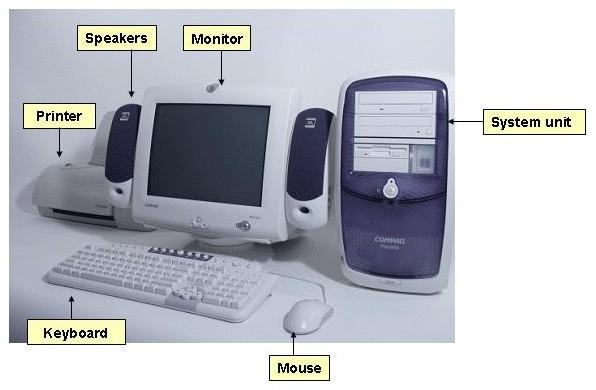
Figure 2 Hardware components
The diagram below indicates the hardware components inside the system unit. Each of these components plays an essential role in the operation of a computer system.
Figure 3 Components inside the system unit
Hardware components provide the physical interface to a computer system. However, they cannot function without instructions to operate them. These instructions are software programs.
Software System—Operating System Software and Application Software
The two different types of software programs are (1) operating system software and (2) application software. The diagram below illustrates the levels of interaction among users, application software, operating system software, and the hardware system.
Figure 4 Interaction among hardware system, operating system software, application software, and users
The operating system software serves as the interface between application software and the hardware components. And, the application software interfaces with the users of the computer system.
Operating system software provides instructions to hardware system components. Examples of operating systems are the Microsoft Windows operating system and the Macintosh operating system. When an input is entered, the operating system program provides instructions to send the input to appropriate hardware components for processing. Then, it provides instructions for the result to be sent to the appropriate output device. For example, when a user types using a keyboard, the Microsoft Windows operating system takes the input sent through the keyboard and displays the typed letters on the monitor. You will learn more about how operating system software works in Unit 3. Operating System Software.
Application software provides instructions that enable the user to perform specific tasks such as creating presentations, composing written documents, and editing images. Examples of application software programs are Microsoft Word and Notepad. Application software instructions are handled by the operating system. For instance, when you open a file using Microsoft Word, first the application provides the user-interface for you to specify which file you want to open (for example, the menu bar). Once you have selected the file, the application notifies the operating system that a certain file is needed. The operating system then requests for the file from the hard drive of the computer. You can view the application software currently on your computer by clicking on the Start button and select Programs. If you are reading this page online, then you are probably using the Internet Explorer or Netscape web browser program. More about how application software works will be discussed in Unit 4. Application Software.
Network System
The worldwide system of computer networks is the Internet, a network of networks. Via the Internet, computers on the network can access other computers on the network. The Internet allows data to be moved from one computer to another.
The network system manages how data is transferred from one computer to another and how different components of a network system work together. The diagram below illustrates the network components needed for a computer to communicate to other computer via the Internet.
Figure 5 Network connection components
A network interface card (NIC) sends data from a computer over a network, and collects incoming data sent by other computers. A modem is a device that enables data from a computer to be transmitted via phone lines or television cable lines to reach other computers on the Internet. In addition to these hardware network components, a computer also needs an Internet service provider such as America Online to enable its connection to the Internet. Application software such as Web browsers (for example, Internet Explorer and Netscape) and electronic mail (for example, Outlook and Netscape Mail) also enhance the usefulness of a network system. More about how the network system works will be discussed in Unit 5. Network Systems.
© Copyright 1999-2009 iCarnegie, Inc. All rights reserved.
1.2 Evolution of Computer Systems
In this section, you will learn about both the origins and the advancements of computer technology. Then you will explore innovative uses of computers to enhance different aspects of our lives. You may also discover how computers can be helpful in your field of interest, whether it is education services, medical research, business management, or entertainment. At the end of this section, you can read about the computer industry, which has become a major segment of the world economy, generating many types of career opportunities and businesses.
|
Reading Sequence:
In Addition: There are several popular websites for job seekers. After completing this reading, go to Monster.com and click Search Jobs to search for computer-related jobs in your area. First, in the Location Search box, select a location near you, and then enter a keyword such as "programmer" or "database" in the Keyword Search box.
|
|
Assessment: |
1.2.1 Brief History
As commerce developed in earlier societies, people began to realize the need for a bookkeeping system to enable them to add, subtract, and record simple transactions. To facilitate the bookkeeping process, counting devices were developed. At first, people used fingers, stones, and sticks to count. Later on, mechanical calculators emerged, but they were slow and bulky. When electricity was discovered, electronic components replaced the bulky mechanical parts and enabled smaller, faster computing devices. Computers are continually evolving towards faster computations, increased storage capacity, and smaller size, while maintaining their affordability.
With advancements in computing devices, the uses of computers have gone beyond the scope of commerce and they are integral to many aspects of our lives. Purchases are processed through computers. Products are designed using computers. Movies are made with computer simulations. The growth of the computing industry is driven by the numerous ways computing technology can be applied in areas such as commerce, communications, banking, and education. In the next section, we will discuss how computer technology can be used.
We will begin our discussion on how computers developed by examining periods in time characterized by its pioneering research to bring computing to solve data-intensive or compute-intensive problems. You will see how computing methods advanced to where we are today.
1200s—Manual Calculating Devices
Manual calculating devices required the use of hands to move components on the device.
The first calculation device, the abacus, was used in China. It involved manually moving beads to do calculations. Below is a picture of an abacus.
Figure 1 Abacus
1600s—Mechanical Calculators
Mechanical calculators used wheels, gears, and counters.
1642: Blaise Pascal invented the Pascaline, which is a mechanical calculator. The machine used some principles of the abacus, but used wheels to move counters.
1800s—Punched Cards
Punched cards use holes following a specific pattern to represent the instructions given to the machine or stored data. The idea of storing data and program instructions on punched cards came from the Jacquard loom. It used pasteboard cards with patterns of punched holes to produce mass quantity of fabrics weaved in a variety of patterns. Each punched card represents a pattern and the punched card can be fed through the Jacquard loom to produce weaved fabrics of the pattern repeatedly. Similarly, different program instructions can be stored on separate punched cards, which can be fed through the computing machine repeatedly. Using punched cards, program instructions and data can be stored.
1834: Charles Babbage designed a new general-purpose calculating device, the Analytical Engine, which is the ancestor of modern computers. It included the essential components of present-day computers, which are input, process, storage, and output of data.
Babbage's assistant, Augusta Ada King, Countess of Lovelace and daughter of English poet Lord Byron, would create the instruction routines stored on punched cards to tell the machine what to do. Instruction routines used by the computer are known as "computer programs." She is thus the first female computer programmer, and in her honor, the U.S. Defense Department named the programming language ADA.
Below is an image of an analytical engine.
Figure 2 Analytical engine
1890: Herman Hollerith designed an electronic punched card tabulating device that enabled the U.S. Census Bureau to tabulate the 1890 census in six months, which would have otherwise taken more than 7 years. Hollerith’s machine used punched cards to store data instead of instruction routines.
1896: Hollerith thought the business world could benefit from the electronic punched card tabulating device, and founded Tabulating Machine Company, which later became International Business Machines (IBM) in 1924.
1940s—Vacuum Tubes
Vacuum tubes are used to control the flow of electrons. Since vacuum tubes responded faster than mechanical components, faster computations were possible. But, the tubes consumed a lot of power and burned out quickly.
Below is a picture of vacuum tubes.
Figure 3 Vacuum tubes
1945: The first computer prototype using vacuum tubes, ENIAC (Electronic Numerical Integrator and Computer) was designed to calculate trajectory tables for the U.S. Army during World War II, but it was not completed until three months after the war.
The machine was 100 feet long and 10 feet high and weighed 30 tons. It had over 18,000 vacuum tubes. But, in the first year, a total of 19,000 tubes burned out and were replaced. The ENIAC could perform 5,000 additions per second, but its operation has to be programmed manually by connecting cables and setting 6,000 switches.
The first commercially successful computer, UNIVAC was developed by Eckert-Mauchly Computer Corporation (later acquired by Remington Rand). The machine was 14.5 feet long, 7.5 feet high, and 9 feet wide. It could read 7,200 characters per second. It was priced at $930,000. Another important development was the invention of the compiler by Admiral Grace Hopper who was working at Eckert-Mauchly Computer Corporation at the time. A compiler enables program instructions to be written in English and then translated into a language that the machine can understand. This invention made the task of programming easier and faster.
1950s—Transistors
Transistors performed functions similar to vacuum tubes but they were smaller, cheaper, and more reliable. Additionally, they consumed less power. The ability for transistors to replace vacuum tubes was first demonstrated in AT&T’s Bell Laboratories. Transistor-based computers could perform 200,000 to 250,000 calculations per second.
Transistors are also used in other electrical devices such as the radio. Below is a picture of a radio and transistors.
Figure 4 Transistors
1960s—Integrated Circuits
An integrated circuit, also called a "microchip" or "chip," is a thin slice of silicon packed with microscopic circuit elements such as wires, transistors, capacitors, and resistors. It was developed in 1958 by Jack Kilby at Texas Instruments and independently by Robert Noyce at Fairchild Semiconductor. Integrated circuits enabled the equivalent of thousands of vacuum tubes or transistors to be packed onto a single miniature chip about the size of your fingernail, reducing the physical size, weight, and power requirements for devices such as computers. Computers became ever smaller as more components could fit onto the chip. More information about the IC chip can be found at the Smithsonian Institute's Jerome and Dorothy Lemelson Center for the Study of Invention and Innovation.
1970s to Present—Microprocessor
The microprocessor combined components of a computer on a microchip. Before the microprocessor was developed, each integrated circuit had to be manufactured for a particular purpose, but now a microprocessor can be manufactured and then programmed for various purposes to other needs. Below is a picture of a microprocessor. Note that millions of wires are etched onto an area the size of a fingernail.
Figure 6 Microprocessor chip
The first general-purpose microprocessor was the Intel 4004. It was developed in 1971 by Ted Hoff. The Intel 4004 enabled microprocessor-based computer systems to become faster, smaller, and less expensive than before.
Pace of Advancement
Transistors are still continuing to decrease in size. As transistors become smaller, more transistors can be placed on a given chip. This implies faster processing speeds and greater data storage capacity. In 1965, Gordon Moore, a founder of Intel, one of the largest microchip manufacturers, made his observation that there is an exponential growth in the number of transistors per integrated circuit. He predicted that the number of transistors that can be put on a microchip will double every 12 months, until physical limitations are reached. This observation was termed "Moore’s Law." Now the exponential growth has slowed down to doubling every 18 months, nevertheless, the rate of growth is still exponential. The figure below shows the number of transistors on a microchip increasing exponentially. More about Moore’s Law will be explained in page 2.5.1 Moore’s Law.
Figure 7 Moore's Law applied to Intel processors [Moore's Law, The Future - Technology & Research at Intel]
|
|
Year of Introduction |
Transistors |
|
4004 |
1971 |
2,250 |
|
8008 |
1972 |
2,500 |
|
8080 |
1974 |
5,000 |
|
8086 |
1978 |
29,000 |
|
286 |
1982 |
120,000 |
|
386TM processor |
1985 |
275,000 |
|
486TM DX processor |
1989 |
1,180,000 |
|
Pentium® processor |
1993 |
3,100,000 |
|
Pentium II processor |
1997 |
7,500,000 |
|
Pentium III processor |
1999 |
24,000,000 |
|
Pentium 4 processor |
2000 |
42,000,000 |
|
Itanium 2 processor |
2002 |
220,000,000 |
Table 1 Number of transistors used in Intel processors over the years [Intel Research Site]
1.2.2 Applications of Computer Systems
Computer systems are instrumental in improving our lives in many ways. You will see in the following examples how the innovative use of computers can enhance how we learn, conduct business, and enjoy life. As you begin to explore the applications of computer systems, think about how you can use or develop computer technologies in your own field of interest.
In Education
Multimedia-Facilitated Learning
Multimedia is defined by Webopedia as "the use of computers to present text, graphics, video, animation, and sound in an integrated way." Software applications such as Microsoft PowerPoint allow lectures to be conducted with animated visual aids. Educational software applications can be used to enhance students' learning by providing an interactive, multimedia environment that can be more engaging. Students can click on buttons on the computer screen to access different sections of the learning material. An example of this can be found on the Intel education site (requires Flash Player). Computers can help enrich students' learning experience.
Simulation-Based Education
Computers can be programmed to generate images and animations that model other systems. These systems can be those that exist in the physical world in which we live (for example, people and objects), as well as those from the imagination (e.g. life on the moon and mythical beings). For example, the Sim Theme Park program allows users to design their own roller coasters, and provides the option to turn off gravity. Simulations can also be used to emulate scenarios that may be too dangerous to practice with real people. Pilots often use simulations when learning about new equipments. Furthermore, computers can be used to model elements that are hard to observe such as molecular structures. You will see how simulations can help learning in the following examples.
The Talking Head below demonstrates how it may be used in language training. The Talking Head realistically simulates the head of a human being, with a computer-synthesized voice that sounds human-like. Click on the image below to see a demonstration of how 3-D imaging and voice simulation can assist in language learning in ways that may not be achievable in the real world.
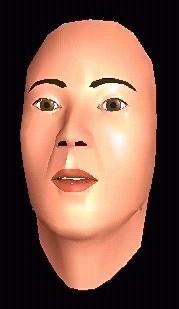
Figure 1 The Talking Head
Courtesy of Dominic Asarco, Professor of Psychology, University of California- Santa Cruz
Other examples of simulation-based training discussed below are medical training, molecular modeling, and military training.
• Medical Training
In the U.S. army, a 3-D virtual reality (VR) software is used to help measure and improve the effectiveness of medical training in the field. The software enables students to practice trauma assessment and treatment on wounded soldiers using their computer. This would eliminate the need to send trainees to the field and expedite the training process. Details about the training software can be found in the article, "3-D Training Software Helps Army Compare Medical Training Methodologies".
A joint research project in surgical simulation was conducted by Millers University’s Haptics research group and Penn State University’s College of Medicine. The project aimed at developing software that can be used to simulate a suite of surgical procedures. Using a virtual reality surgical simulator that provides sensitive touch feedback along with realistic 3D imagery (virtual reality), medical students and surgeons will be able to practice and test their surgery skills. This would decrease consumption of resources such as organs and physical surgery spaces.
Below is an image of a medical student at the deformable organs simulation station using a pair of scissors.
Figure 2 Student using simulation tool
The student sees the image below- a deformable stomach and the scissors that the student uses to interact with the visual simulation.
Figure 3 Deformable stomach being manipulated by a virtual scissors
© Copyright 2002 Department
of Computer Science, Millersville University
Reprinted with permission.
• Molecule Modeling
Researchers from the Department of Biochemistry and Molecular Biophysics in Columbia University and the Howard Hughes Medical Institute use a software visualization tool, Graphical Representation and Analysis of Structural Properties (GRASP), to create 3-D models of chemical molecules and explore their properties.
Below is a screenshot of a DNA simulation.
Figure 4 DNA modeling
© Copyright 2002 Barry
Honig's group
in the Department of Biochemistry and Molecular Biophysics of
Columbia University and the Howard Hughes Medical
Institute.
Reprinted with permission.
Visual simulations of molecules can also be animated to show how they change over time. See recordings of molecule simulations. More visual simulations for studies in Chemistry can be found at http://www.csc.fi/chem/gallery.phtml.
An interdisciplinary applied research center, CRS4 (Center for Advanced Studies, Research and Development in Sardinia), is developing simulation techniques to create visual models in the various fields including medical imaging, fluid dynamics, environment modeling, and more. See CRS4’s Animation Gallery.
• Military Training
3-D simulations can be used build virtual environments that replicate the interior of military crafts to train engineering officers for material readiness assessment. Using simulations, physical crafts do not need to be used during training, and the number of people that can be trained at one time is not limited. Additionally, training can be provided to persons in different geographic locations. You can learn more about the benefit of virtual reality simulations in training on the Education & Training Technology page from Research Triangle Institute (RTI)
Below is a screenshot of a virtual environment built by Research Triangle Institute (RTI) using 3-D simulation software from Sense8.
Figure 5 Virtual training for military personnel
© Copyright 2001 Research
Triangle Institute.
Reprinted
with permission.
Intelligent Machine-Based Training
Computer systems can be programmed to react based on user behavior. For example, to facilitate learning a foreign language, researchers at Carnegie Mellon University developed Fluency: Automatic Foreign Language Pronunciation Training software that can interpret pronunciations and provide feedback on how we pronounce a word and how to correct the pronunciations.