ВУЗ: Не указан
Категория: Не указан
Дисциплина: Не указана
Добавлен: 17.04.2021
Просмотров: 1365
Скачиваний: 2

6
SOAP
A SOAP API is defined as a receiver of an XML document and is also
expected to respond with an XML document. The documents should
follow a format standardized by W3C.
All parameters that the receiver needs to be able to respond to should
be a part of the XML document sent.
Testing a SOAP API means manipulating a request XML and interpret-
ing a response XML.
REST
REST or RESTful APIs encode all parameters in the request. A RESTful
service is never stateful. The server should not keep any state about a
client.
Testing a REST API means manipulating the request URI and interpret-
ing the answer. The answer may be of many different formats. XML is
possible, but formats like JSON or plain text are also possible.
Testing APIs
There are some initial challenges when testing an API. There is no
graphical user interface, and, you must understand a response that
hasn’t primarily been created to be read by humans.
No graphical user interface
APIs are primarily intended for computer-to-computer communication.
Computers don’t have any use of a user interface designed for a hu-
man. This is a challenge if you are a tester who is accustomed to testing
software designed for end-users, with a graphical interface you can
click, drag-and-drop, collapse, close, and in general manipulate on the
screen.
A solution is to use testing tools that will assist you as much as possible
to create requests and view the responses.

7
SoapUI and SoapUI Pro are two tools that will make your life as a tester
less complicated, by providing interfaces to enter your request, asser-
tions to validate your response, various tools to create and maintain
your tests, and reports to print and share with your colleagues. The tools
also give you a user interface to both call APIs, and analyze answers
from APIs. Hence the “UI” ending in SoapUI, meaning User Interface.
Request and response
SOAP-based APIs use XML as a communication protocol. It must pro-
vide an XML descriptor (WSDL), that in machine terms, clearly defines
all types of request elements the SOAP API will accept, and all types of
response elements it will send back. This means that you, as a tester,
must be able to read, understand, create and update XML documents to
be able to test a SOAP API.
In REST-based services, the request is much simpler, for the most part
only involving sending a URL (or URI) to the service. The responses
returned are usually in the format JSON or XML. These are, again, not
formatted to be consumed by human beings, i.e. you.
This means testing the service may be a challenge without a good tool.
Once again, SoapUI and SoapUI Pro will make your life as a tester
easier. You will be able to do small changes to an XML request and get
a response back from the server that you can validate. SoapUI will as-
sist you with response validations, response format, and response times
so that expected SLAs can be asserted.
Exploring
A common situation when SoapUI is used, is when an unknown API is
explored.
With the API computer-to-computer communication, the API will act as
the host and you need to have another piece of code that would act
as an API client. You can set up SoapUI as the API client. This is very
convenient and saves a lot of time. This is common among developers


8
who need to write a client for an unknown service. Exploring a service
is probably less common among testers, as they tend to have an API
that is known and should be verified. The exploring and discovering has
already been done.
Getting started
You need to do a few things to be able to use SoapUI. This section will
help you
¿
Set up SoapUI
¿
Get started with your first project
¿
Add a test suite
¿
Add a test
¿
Add an assertion
¿
Run a test suite
I will use baby steps to allow for a beginner to follow. I hope it isn’t too
detailed for you.
Let’s begin at the beginning and install SoapUI.
Installing
. Follow the download link
to get the version you want. Both SoapUI and SoapUI Pro are available
at the same location.
SoapUI is available for many different operating systems. Just follow the
installation instructions for your operating system:
¿
Windows:
www.soapui.org/Getting-Started/installing-on-
¿

9
¿
www.soapui.org/Getting-Started/installing-on-linuxunix.
SoapUI is installed. Let’s continue with a small example project.
Your first project
Let’s create a project.
There is an API that will take two currencies and return the currency
conversion. Let’s use that for our example. It has very few moving parts,
so it will be a good starting point.
¿
Start SoapUI.
¿
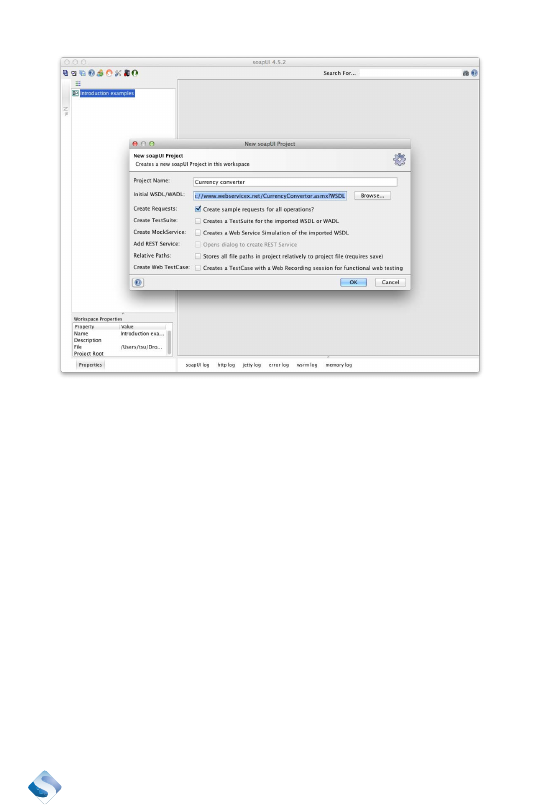
Create a new project, File | New soapUI Project.
¿
Give it a descriptive name. I choose to name it “Currency
converter.” Enter the URL to a description of the service in
the field “Initial WSDL/WADL”:
¿
The checkbox, “Create Requests” is checked by default. Leave
the defaults and click “OK.” SoapUI will now call the API to get
its details.
10
A new project should have shown up in the Navigator section in top-left
section of SoapUI. There are two versions of the service: “Curren-
cyConverterSoap” and “CurrencyConverterSoap12”. The difference
between these is that the first one follows an older standard of SOAP
compared to the latter one. Which one we use in this example doesn’t
matter, so I will remove “CurrencyConverterSoap12”. Mark it and press
the Delete button, or right click on “CurrencyConverterSoap12” and
choose Remove.