ВУЗ: Не указан
Категория: Не указан
Дисциплина: Не указана
Добавлен: 17.04.2021
Просмотров: 3721
Скачиваний: 3

Introduction to Python for Science, Release 0.9.23
6.1.1
if
,
elif
, and
else
statements
The
if
,
elif
, and
else
statements are used to define conditionals in Python. We
illustrate their use with a few examples.
if
-
elif
-
else
example
Suppose we want to know if the solutions to the quadratic equation
ax
2
+
bx
+
c
= 0
are real, imaginary, or complex for a given set of coefficients
a
,
b
, and
c
. Of course, the
answer to that question depends on the value of the discriminant
d
=
b
2
−
4
ac
. The
solutions are real if
d
≥
0
, imaginary if
b
= 0
and
d <
0
, and complex if
b
6
= 0
and
d <
0
. The program below implements the above logic in a Python program.
1
a
=
float
(
raw_input
(
"What is the coefficients a? "
))
2
b
=
float
(
raw_input
(
"What is the coefficients b? "
))
3
c
=
float
(
raw_input
(
"What is the coefficients c? "
))
4
5
d
=
b
*
b
-
4.
*
a
*
c
6
7
if
d
>=
0.0
:
8
(
"Solutions are real"
)
# block 1
9
elif
b
==
0.0
:
10
(
"Solutions are imaginary"
)
# block 2
11
else
:
12
(
"Solutions are complex"
)
# block 3
13
14
(
"Finished!"
)
After getting the inputs of from the user, the program evaluates the discriminant
d
. The
code
d >= 0.0
has a boolean truth value of either
True
or
False
depending on
whether or not
d
≥
0
. You can check this out in the interactive IPython shell by typ-
ing the following set of commands
In [2]:
d
=
5
In [3]:
d
>=
2
Out[3]:
True
In [4]:
d
>=
7
Out[4]:
False
100
Chapter 6. Conditionals and Loops
Introduction to Python for Science, Release 0.9.23
Therefore, the
if
statement in line 7 is simply testing to see if the statement
d >= 0.0
if
True
or
False
. If the statement is
True
, Python executes the indented block of
statements following the
if
statement. In this case, there is only one line in indented
block. Once it executes this statement, Python skips past the
elif
and
else
blocks and
executes the
print("Finished!")
statement.
If the
if
statement in line 7 is
False
, Python skips the indented block directly be-
low the
if
statement and executes the
elif
statement. If the condition
b == 0.0
is
True
, it executes the indented block immediately below the
elif
statement and
then skips the
else
statement and the indented block below it. It then executes the
print("Finished!")
statement.
Finally, if the
elif
statement is
False
, Python skips to the
else
statement and exe-
cutes the block immediately below the
else
statement. Once finished with that indented
block, it then executes the
print("Finished!")
statement.
As you can see, each time a
False
result is obtained in an
if
or
elif
statement, Python
skips the indented code block associated with that statement and drops down to the next
conditional statement, that is, the next
elif
or
else
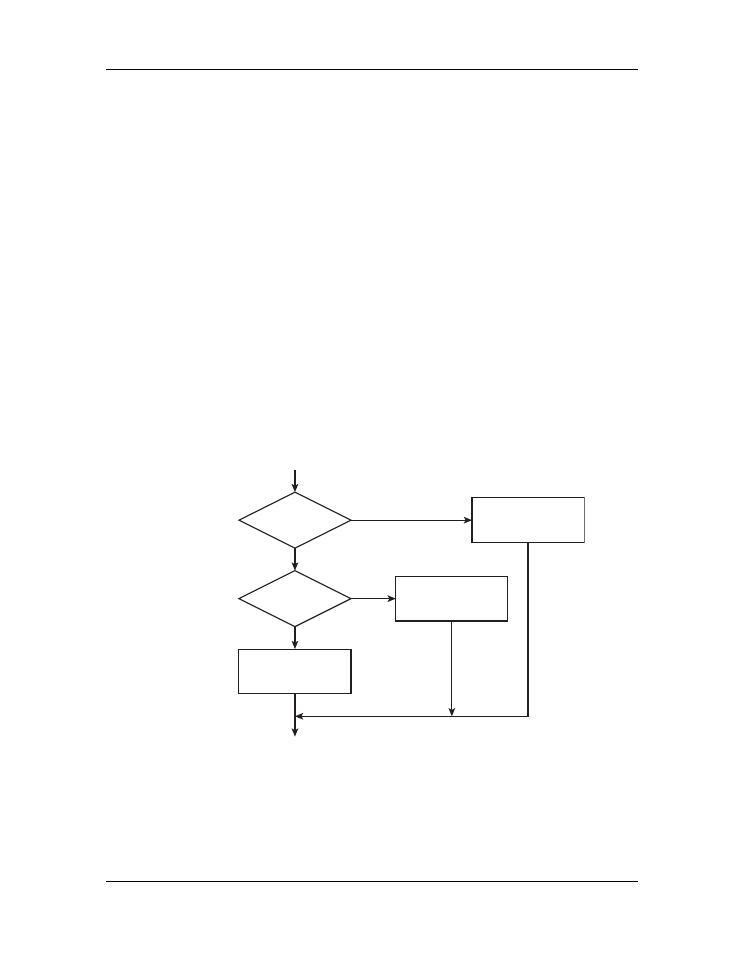
. A flowchart of the if-elif-else code
is shown below.
False
False
True
True
d≥0?
b=0?
block 1
block 2
block 3
if
elif
else
start
finish
Figure 6.1: Flowchart for
if
-
elif
-
else
code.
At the outset of this problem we stated that the solutions to the quadratic equation are
imaginary only if
b
= 0
and
d <
0
. In the
elif b == 0.0
statement on line 9,
6.1. Conditionals
101


Introduction to Python for Science, Release 0.9.23
however, we only check to see if
b
= 0
. The reason that we don’t have to check if
d <
0
is that the
elif
statement is executed only if the condition
if d >= 0.0
on line 7
is
False
. Similarly, we don’t have to check if if
b
= 0
and
d <
0
for the final
else
statement because this part of the
if
,
elif
, and
else
block will only be executed if
the preceding
if
and
elif
statements are
False
. This illustrates a key feature of the
if
,
elif
, and
else
statements: these statements are executed sequentially until one of
the
if
or
elif
statements is found to be
True
. Therefore, Python reaches an
elif
or
else
statement only if all the preceding
if
and
elif
statements are
False
.
The
if
-
elif
-
else
logical structure can accomodate as many
elif
blocks as desired.
This allows you to set up logic with more than the three possible outcomes illustrated in
the example above. When designing the logical structure you should keep in mind that
once Python finds a true condition, it skips all subsequent
elif
and
else
statements in
a given
if
,
elif
, and
else
block, irrespective of their truth values.
if
-
else
example
You will often run into situations where you simply want the program to execute one of
two possible blocks based on the outcome of an
if
statement. In this case, the
elif
block is omitted and you simply use an
if
-
else
structure. The following program test-
ing whether an integer is even or odd provides a simple example.
a = int(raw_input("Please input an integer: "))
if a%2 == 0:
print("{0:0d} is an even number.".format(a))
else:
print("{0:0d} is an odd number.".format(a))
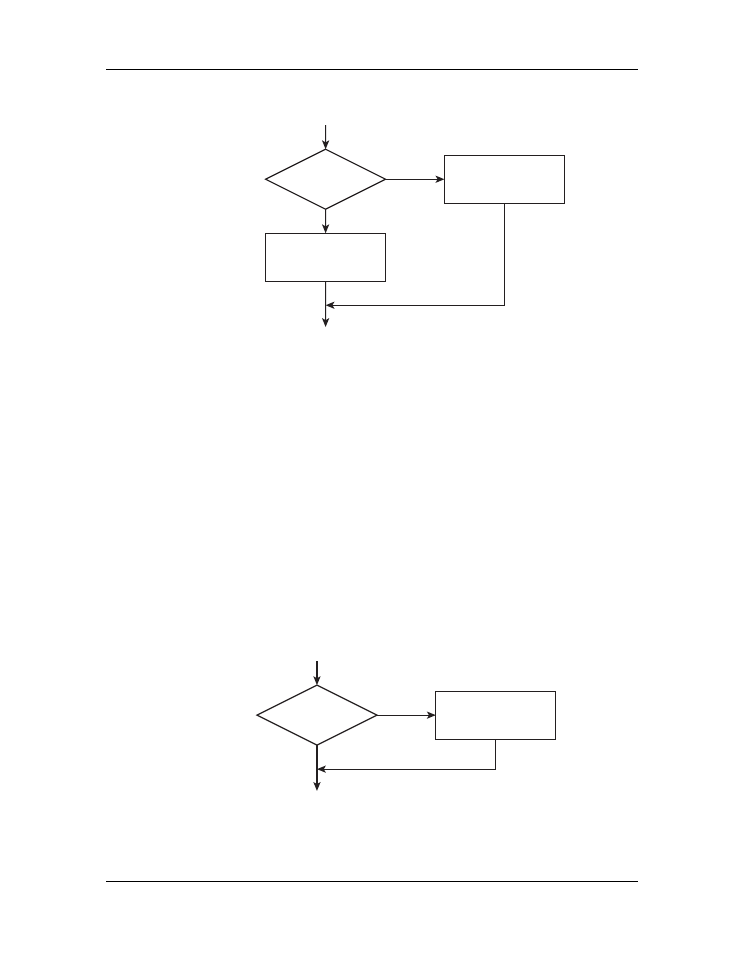
The flowchart below shows the logical structure of an
if
-
else
structure.
if
example
The simplest logical structure you can make is a simple
if
statement, which executes a
block of code if some condition is met but otherwise does nothing. The program below,
which takes the absolute value of a number, provides a simple example of such a case.
a = eval(raw_input("Please input a number: "))
if a < 0:
a = -a
print("The absolute value is {0}".format(a))
102
Chapter 6. Conditionals and Loops
Introduction to Python for Science, Release 0.9.23
False
True
d≥0?
block 1
block 2
if
else
start
finish
Figure 6.2: Flowchart for
if
-
else
code.
When the block of code in an
if
or
elif
statement is only one line long, you can write
it on the same line as the
if
or
elif
statement. For example, the above code can be
written as follows.
a = eval(raw_input("Please input a number: "))
if a < 0: a = -a
print("The absolute value is {0}".format(a))
This works exactly as the preceding code. Note, however, that if the block of code asso-
ciated with an
if
or
elif
statement is more than one line long, the entire block of code
should be written as indented text below the
if
or
elif
statement.
The flowchart below shows the logical structure of a simple
if
structure.
False
True
d≥0?
block 1
if
start
finish
Figure 6.3: Flowchart for
if
code.
6.1. Conditionals
103

Introduction to Python for Science, Release 0.9.23
6.1.2 Logical operators
It is important to understand that “
==
” in Python is not the same as “
=
”. The operator “
=
”
is the assignment operator:
d = 5
assigns the value of 5 to the valiable
d
. On the other
hand “
==
” is the
logical equals operator
and
d == 5
is a
logical truth statement
. It tells
Python to check to see if
d
is equal to
5
or not, and assigns a value of
True
or
False
to the statement
d == 5
depending on whether or not
d
is equal to
5
. The table below
summarizes the various logical operators available in Python.
operator
function
<
less than
<=
less than or equal to
>
greater than
>=
greater than or equal to
==
equal
!=
not equal
and
both must be true
or
one or both must be true
not
reverses the truth value
Logical operators in Python
The table above list three logical operators,
and
,
or
, and
not
, that we haven’t encoun-
tered before. There are useful for combining different logical conditions. For example,
suppose you want to check if
a >
2
and
b <
10
simultaneously. To do so, you would
write
a>2 and b<10
. The code below illustrates the use of the logical operators
and
,
or
, and
not
.
In [5]:
a
=
5
In [6]:
b
=
10
In [7]:
a
!=
5
# a is not equal to 5
Out[7]:
False
In [8]:
a
>
2
and
b
<
20
Out[8]:
True
In [9]:
a
>
2
and
b
>
10
Out[9]:
False
In [10]:
a
>
2
or
b
>
10
Out[10]:
True
104
Chapter 6. Conditionals and Loops