ВУЗ: Не указан
Категория: Не указан
Дисциплина: Не указана
Добавлен: 17.04.2021
Просмотров: 3733
Скачиваний: 3

Introduction to Python for Science, Release 0.9.23
In [11]:
a
>
2
Out[11]:
True
In [12]:
not
a
>
2
Out[12]:
False
Logical statements like those above can be used in
if
,
elif
, and, as we shall see below,
while
statements, according to your needs.
6.2 Loops
In computer programming a
loop
is statement or block of statements that is executed
repeatedly. Python has two kinds of loops, a
for
loop and a
while
loop. We first
introduce the
for
loop and illustrate its use for a variety of tasks. We then introduce the
while
loop and, after a few illustrative examples, compare the two kinds of loops and
discuss when to use one or the other.
6.2.1
for
loops
The general form of a
for
loop in Python is
for
<
itervar
>
in
<
sequence
>
:
<
body
>
where
<intervar>
is a variable,
<sequence>
is a sequence such as list or string or
array, and
<body>
is a series of Python commands to be executed repeatedly for each
element in the
<sequence>
. The
<body>
is indented from the rest of the text, which
difines the extent of the loop. Let’s look at a few examples.
for
dogname
in
[
"Max"
,
"Molly"
,
"Buster"
,
"Maggie"
,
"Lucy"
]:
(dogname)
(
"
Arf, arf!"
)
(
"All done."
)
Running this program produces the following output.
In [1]:
run doggyloop
.
py
Max
Arf, arf!
Molly
Arf, arf!
6.2. Loops
105

Introduction to Python for Science, Release 0.9.23
Buster
Arf, arf!
Maggie
Arf, arf!
Lucy
Arf, arf!
All done.
The
for
loop works as follows: the
iteration variable
or
loop index
dogname
is set
equal to the first element in the list,
"Max"
, and then the two lines in the indented body
are executed. Then
dogname
is set equal to second element in the list,
"Molly"
, and the
two lines in the indented body are executed. The loop cycles through all the elements of
the list, and then moves on to the code that follows the
for
loop and prints
All done.
When indenting a block of code in a Python
for
loop, it is critical that every line be
indented by the same amount. Using the
<tab>
key causes the Code Editor to indent 4
spaces. Any amount of indentation works, as long as it is the same for all lines in a
for
loop. While code editors designed to work with Python (including Canopy and Spyder)
translate the
<tab>
key to 4 spaces, not all text editors do. In those cases, 4 spaces are
not equivalent to a
<tab>
character even if they appear the same on the display. Indenting
some lines by 4 spaces and other lines by a
<tab>
character will produce an error. So
beware!
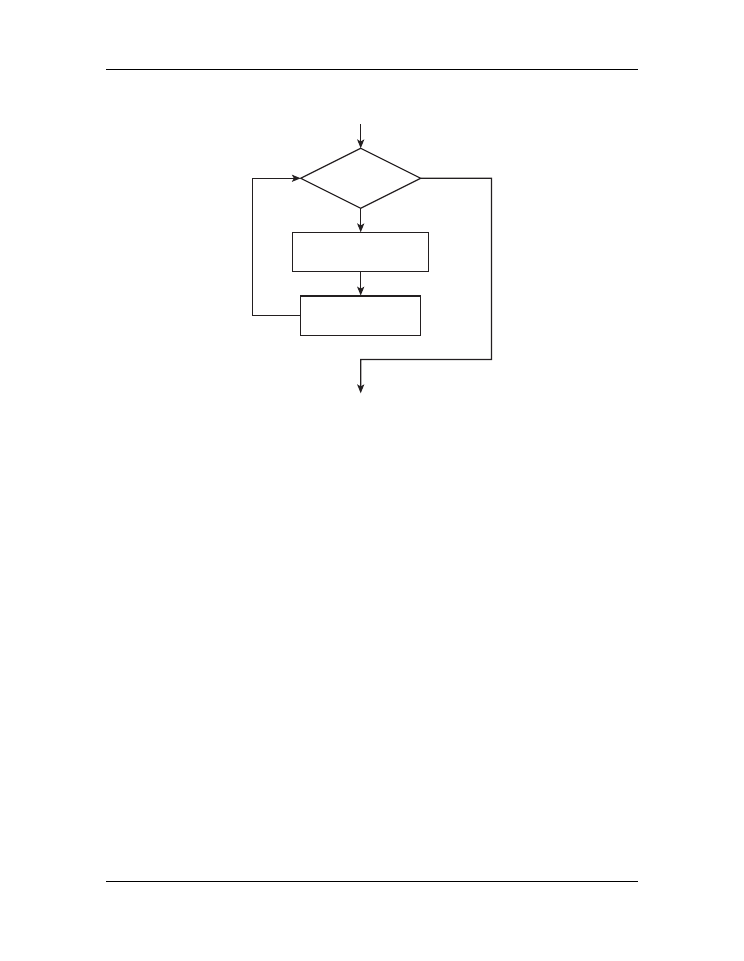
The figure below shows the flowchart for a
for
loop. It starts with an implicit conditional
asking if there are any more elements in the sequence. If there are, it sets the iteration
variable equal to the next element in the sequence and then executes the body—the in-
dented text—using that value of the iteration variable. It then returns to the beginning to
see if there are more elements in the sequence and continues the loop until there is none
remaining.
6.2.2 Accumulators
Let’s look at another application of Python’s
for
loop. Suppose you want to calculate
the sum of all the odd numbers between 1 and 100. Before writing a computer program
to do this, let’s think about how you would do it by hand. You might start by adding
1+3=4. Then take the result 4 and add the next odd integer, 5, to get 4+5=9; then 9+7=16,
then 16+9=25, and so forth. You are doing repeated additions, starting with 1+3, while
keeping track of the running sum, until you reach the last number 99.
In developing an algorithm for having the computer sum the series of numbers, we are
going to do the same thing: add the numbers one at a time while keeping track of the
running sum, until we reach the last number. We will keep track of the running sum with
the variable
s
, which is called the
accumulator
. Initially
s=0
, since we haven’t adding
106
Chapter 6. Conditionals and Loops

Introduction to Python for Science, Release 0.9.23
Yes
No
more items
in seq?
<intervar> =
next item in seq
<body>
start
finish
Figure 6.4: Flowchart for
for
-loop.
any numbers yet. Then we add the first number, 1, to
s
and
s
becomes 1. Then we add
then next number, 3, in our sequence of odd numbers to
s
and
s
becomes 4. We continue
doing this over and over again using a
for
loop while the variable
s
accumulates the
running sum until we reach the final number. The code below illustrates how to do this.
1
s
=
0
2
for
i
in
range
(
1
,
100
,
2
):
3
s
=
s
+
i
4
(s)
The
range
function defines the list
[1, 3, 5, ..., 97, 99]
. The
for
loop
successively adds each number in the list to the running sum until it reaches the last
element in the list and the sum is complete. Once the
for
loop finishes, the program
exits the loop and the final value of
s
, which is the sum of the odd numbers from 1 to 99,
is printed out. Copy the above program and run it. You should get an answer of 2500.
6.2.3
while
loops
The general form of a
while
loop in Python is
6.2. Loops
107

Introduction to Python for Science, Release 0.9.23
while
<
condition
>
:
<
body
>
where
<condition>
is a statement that can be either
True
or
False
and
<body>
is
a series of Python commands that is executed repeatedly until
<condition>
becomes
false. This means that somewhere in
<body>
, the truth value of <condition> must be
changed so that it becomes false after a finite number of iterations. Consider the following
example.
Suppose you want to calculate all the Fibonacci numbers smaller than 1000. The Fi-
bonacci numbers are determined by starting with the integers 0 and 1. The next number
in the sequence is the sum of the previous two. So, starting with 0 and 1, the next Fi-
bonacci number is
0 + 1 = 1
, giving the sequence
0
,
1
,
1
. Continuing this process, we
obtain
0
,
1
,
1
,
2
,
3
,
5
,
8
, ...
where each element in the list is the sum of the previous two.
Using a
for
loop to calculate the Fibonacci numbers is impractical because we do not
know ahead of time how many Fibonacci numbers there are smaller than 1000. By con-
trast a
while
loop is perfect for calculating all the Fibonacci numbers because it keeps
calculating Fibonacci numbers until it reaches the desired goal, in this case 1000. Here is
the code using a
while
loop.
x, y
=
0
,
1
while
x
<
1000
:
(x)
x, y
=
y, x
+
y
We have used the multiple assignment feature of Python in this code. Recall that all the
values on the left are assigned using the original values of
x
and
y
.
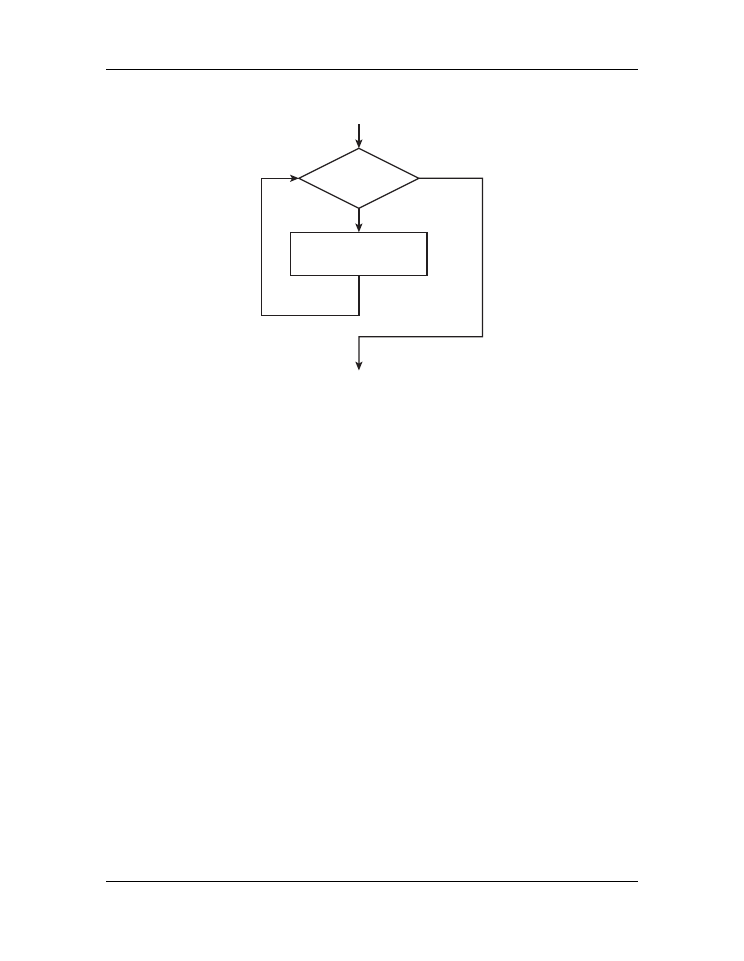
The figure below shows the flowchart for the
while
loop. The loop starts with the eval-
uation of a condition. If the condition is
False
, the code in the body is skipped, the flow
exits the loop, and then continues with the rest of the program. If the condition is
True
,
the code in the body—the indented text—is executed. Once the body is finished, the flow
returns to the condition and proceeds along the
True
or
False
branches depending on
the truth value of the condition. Implicit in this loop is the idea that somewhere during
the execution of the body of the while loop, the variable that is evaluated in the condition
is changed in some way. Eventually that change will cause the condition to return a value
of
False
so that the loop will end.
One danger of a
while
loop is that it entirely possible to write a loop that never
terminates—an
infinite loop
. For example, if we had written
while y > 0:
, in place
of
while x < 1000:
, the loop would never end. If you execute code that has an in-
finite loop, you can often terminate the program from the keyboard by typing
ctrl-C
a
couple of times. If that doesn’t work, you may have to terminate and then restart Python.
108
Chapter 6. Conditionals and Loops
Introduction to Python for Science, Release 0.9.23
True
False
<condition>
<body>
(change condition)
start
finish
Figure 6.5: Flowchart for
while
loop.
For the kind of work we do in science and engineering, we generally find that the
for
loop is more useful than the
while
loop. Nevertheless, there are times when using a
while
loop is better suited to a task than is a
for
loop.
6.2.4 Loops and array operations
Loops are often used to sequentially modify the elements of an array. For example,
suppose we want to square each element of the array
a = np.linspace(0, 32,
1e7)
. This is a hefty array with 10 million elements. Nevertheless, the following loop
does the trick.
import
numpy
as
np
a
=
np
.
linspace(
0
,
32
,
1e7
)
(a)
for
i
in
range
(
len
(a)):
a[i]
=
a[i]
*
a[i]
(a)
Running this on my computer returns the result in about 8 seconds—not bad for having
performed 10 million multiplications. Of course we could have performed the same cal-
culation using the array multiplication we learned in Chapter 3 (
). Here is the code.
6.2. Loops
109